
Apple Notes Brain Dump Shortcut I Use Every Day
Five minutes to set up. Four seconds to use. Ten minutes a week to clear.
Those are the only three numbers in this guide, and the last one is the only one that matters.
Every brain dump article covers the first two. Open a note, get everything out of your head, feel better.
That part genuinely works. I have never met anyone who emptied their head into Apple Notes and did not feel lighter for the next hour.
Then the note sits there.
The following week you start another one. Six months later you have a folder full of notes you have not reopened once, and you quietly decide that brain dumping is not for you.
It works fine. Nobody told you about the third part.
So this guide does the capture, and then it does the part almost nobody writes about: a ten-minute pass, once a week, that empties the note.
Not organizes it. Empties it.
Table of Contents
1. Why brain dumps stop working
1.1 What a brain dump actually is
A brain dump is one unfiltered pass at emptying your head onto a page. Everything, in the order it arrives, with no editing and no sorting.
“Call the dentist” sits directly under “am I in the wrong job” sits directly under “buy batteries.”
That mixture is the whole point.
The moment you start deciding what belongs, you are not dumping anymore; you are planning, and planning is slow enough that you stop capturing.
So a brain dump is not a to-do list.
People use the two words interchangeably, then wonder why the dump is useless as a to-do list.
| Brain dump | To-do list | |
|---|---|---|
| Order | None. Whatever surfaces first | Sorted by priority or by day |
| Contents | Tasks, worries, ideas, half thoughts | Actions only |
| Timing | Nothing has a when | Everything has a when |
1.2 The graveyard note
I went back through my own dump notes from before I had a processing pass.
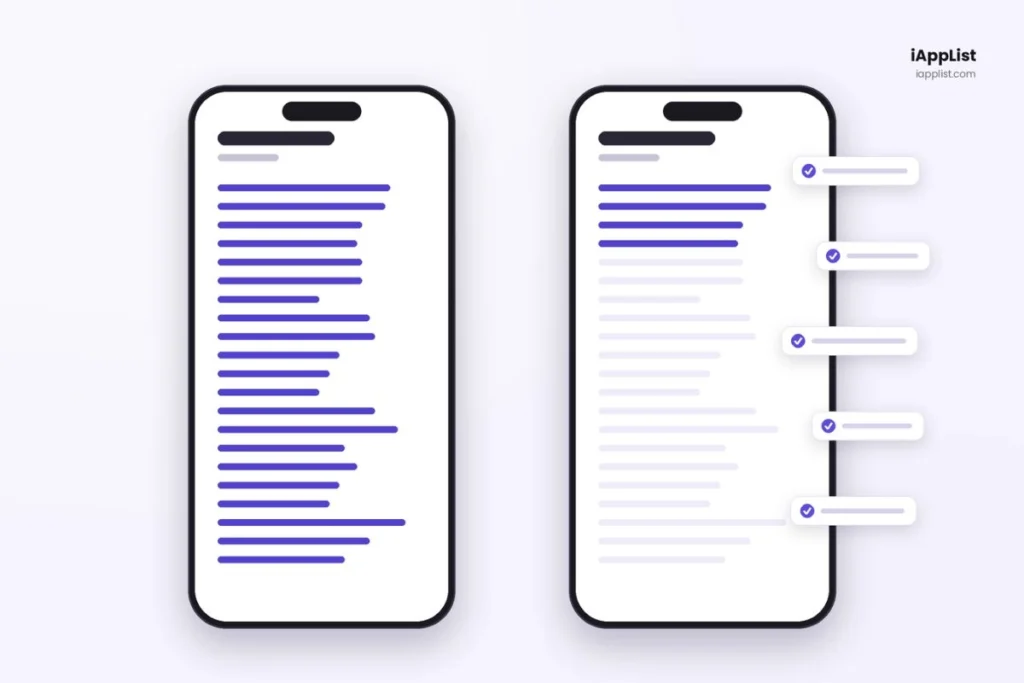
Out of 64 items captured in one week, 53 were still sitting in that note untouched a month later. Once I started running a weekly pass, the same count dropped to 11.
The reason is built into the format.
A dump is fast and messy, which makes it excellent at capture and terrible at retrieval. Nothing in it has a deadline, a category, or a next step, so your brain has no reason to ever go back in.
The note turns into a place thoughts go to be forgotten safely.
That does feel better than forgetting them unsafely, which is why the relief is real. Nothing moves, though.
2. Phase 1: build the container
Five minutes, once. You will not touch any of this again.
2.1 Make the folder and name the first note
Open Notes, tap the folder icon in the top right, then New Folder. Call it Brain Dump.
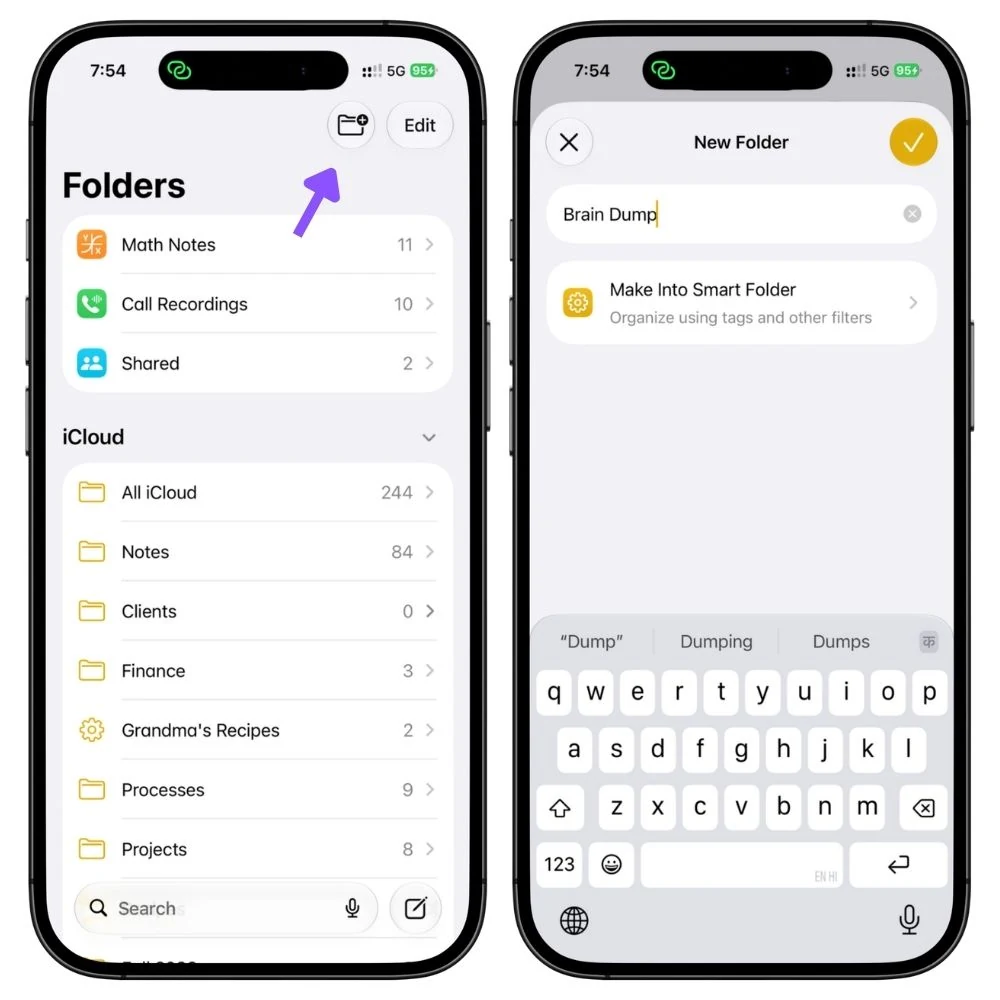
Keep it for dump notes and nothing else, no templates, no archives.
Now create your first note inside it. Name it with today’s date, like this:
Brain Dump Aug 13, 2026
Keep that pattern for every note you make from here.
The shortcut coming up finds your current note by looking for the words Brain Dump in the title, so the name is doing real work, not just labelling.
2.2 Weekly, daily, or one endless note
Three ways to organize this, and they suit genuinely different people.
| Style | Who it suits | Effort | Works with the weekly pass |
|---|---|---|---|
| One note per week | Most people. Project work, thoughts that span a few days | One note a week | Good |
| One note per day | Heavy dumpers who need a blank page every morning | One a day, can be automated | Okay |
| One endless note | Minimalists who hate making files | None | Poor |
I use weekly, and not because it looks tidier. It is the only one of the three where the same thought showing up week after week becomes visible to you, and that turns out to be the most useful thing this whole system does.
Daily notes scatter a recurring worry across seven files, so a thought you had on Tuesday and again the next Wednesday never looks like a pattern.
The endless note has the opposite problem.
You delete lines as you process them, so nothing accumulates, and there is no history to compare against.
Both work fine for capture. Neither gives the weekly pass anything to work with.
If you already know you are a daily person, use daily. Everything else here runs unchanged.
Read also: 11 Ways to Use Apple Notes for Productivity on iPhone
3. Phase 2: capture
Four seconds, all day. This part has to work when you are half asleep or holding a coffee.
3.1 The shortcut and the automation
You can do all of this by hand.
Open Notes, find the folder, tap into the right note, start typing. Four or five taps, and if the note for this week does not exist yet, you make it first.
That sounds like nothing. It is also exactly where brain dumping dies, so I built two small things to remove that gap.
The first is a shortcut called Brain Dump.
You tap it, and your current note opens with the keyboard already up.
Not a note you chose once when you set it up, whichever note is current. Next week’s note, next month’s note, it finds the right one on its own, and there is nothing to update.
The second is an automation.
It runs quietly at 6 am every Monday and creates that week’s note for you, named and ready. You never make a note again. You just dump into whatever is there.
Monday morning is when my week starts. If yours starts Sunday night, or you would rather it fired at noon, open the Shortcuts app, go to the Automation tab, tap the automation and change the day or the time. Nothing else needs to change.
Together they turn capture into one tap from a locked phone, which is fast enough that you actually do it.
Both are built and tested. If you want them, put your email in below, and I will send you the files with setup instructions.
3.2 Five ways in
Now you need a way to fire that shortcut without hunting for it, because opening the Shortcuts app to find your shortcut defeats the whole point.
Your iPhone gives you five. Four of them run the shortcut. Siri needs nothing at all.
| Route | What it needs | Best for |
|---|---|---|
| Action Button | iPhone 15 Pro or later | Everyone who has one. Fastest route there is |
| Lock Screen control | iOS 18 or later | Catching thoughts in bed without unlocking |
| Control Center | iOS 18 or later | A case or grip that makes Back Tap unreliable |
| Siri | Any iPhone | Driving, walking, cooking, hands full |
| Back Tap | iPhone 8 or later | Older iPhones with no Action Button |
Action Button. Settings → Action Button, swipe across to Shortcut, then pick Brain Dump. Squeeze, and you are typing.
If you have a 15 Pro or later, this is the one to set up, and you can skip the rest.
Lock Screen control. Long-press your Lock Screen, tap Customize, remove the camera (or flashlight), then tap the empty slot, search for Run Shortcut, and choose the Brain Dump shortcut.
Now it is reachable without unlocking, which matters more at 11 pm than it sounds.
Control Center. Swipe down from the top right, tap the plus, Add a Control, search for Shortcut, and choose the Brain Dump shortcut.
Slower than the other two, worth having as a fallback.
Siri. Nothing to set up. The shortcut is named Brain Dump, so saying “Brain Dump” runs it.
This is the only route that works with your hands full, so set it up even if the Action Button is your default.
Back Tap. Settings → Accessibility → Touch → Back Tap → Double Tap → Shortcuts, then choose the shortcut.
This is the answer for older iPhones, and it gets close to Action Button speed once your thumb learns it.
4. Phase 3: process the dump
Ten minutes, once a week. This is the section the other four exist to make possible.
Before the steps, the reason they are in this order.
Processing fails because people open a fifty-item note and try to decide what to do about each line.
That decision is expensive, so the overwhelm arrives a second time, and the note gets closed.
So the cheap decisions come first, and the list visibly shrinks before you reach anything hard.
4.1 Set up the pass
Open your current dump note. Select everything, then tap the format button and choose Checklist.
Every line becomes a tickable box.
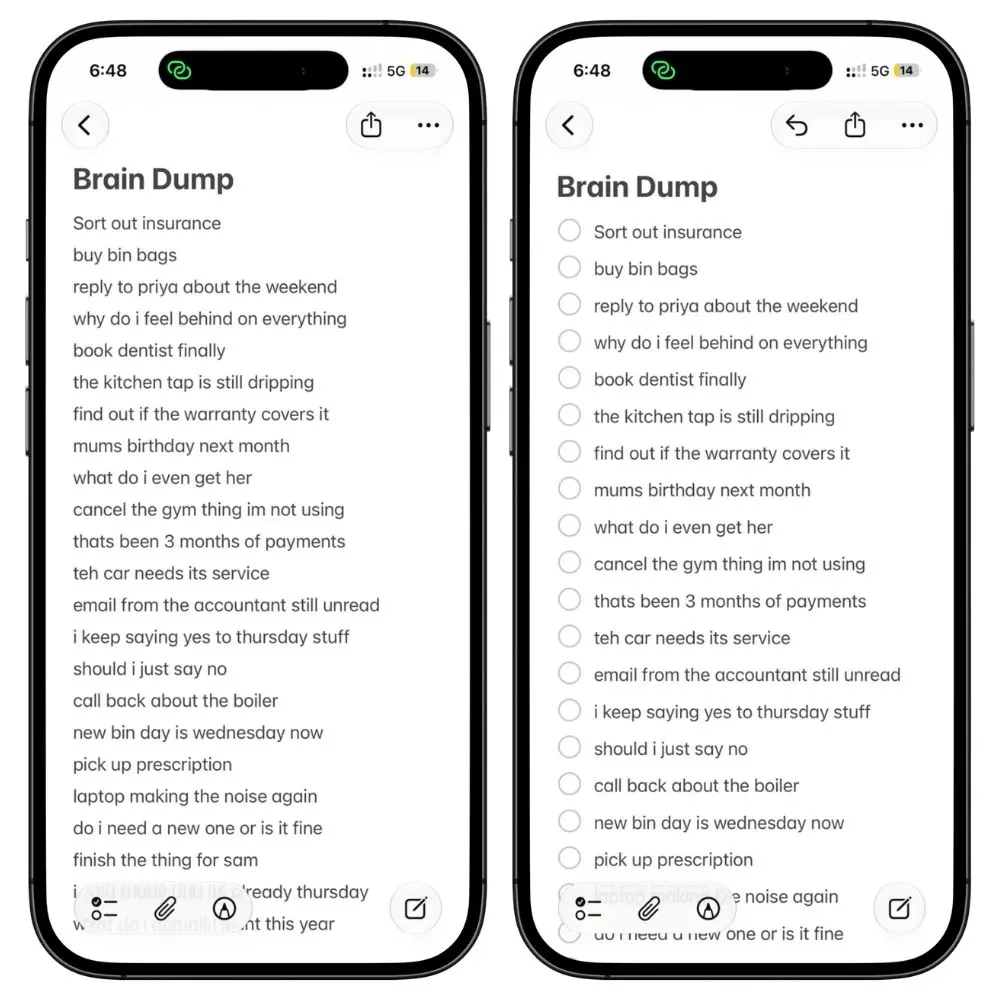
Then, once, go to Settings → Notes → Sort Checked Items and set it to Automatically. Now every item you tick drops to the bottom of the note on its own.
The unprocessed list shrinks in front of you while you work, and that visible shrinking is most of why this pass gets done instead of postponed.
4.2 Pass one: delete (Two minutes)
Read top to bottom and ask one question per line.
Is this still true?
Not what to do about it. Not how important it is. Just whether it still exists.
Half of a week’s dump is already dead by Sunday: the thing got handled, the worry resolved itself, the idea was a 1 am idea.
Tick those and keep moving.
In my notes, this pass alone clears around 30 items. Last week that included “check if the parcel arrived”, which it did on Tuesday, and an idea for a post I could no longer remember the point of. Three seconds each, because there is nothing to decide.
4.3 Pass two: get done (Three minutes)
Now go through what is left and do anything you could finish in under two minutes, right now, while the note is open.
- Send the text
- Book the appointment
- Order the thing
The rule is strict about the two minutes. Anything longer goes to the next pass. Otherwise you are twenty minutes into one item, and the pass is over.
Last week this cleared four things: a reply I had been avoiding since Tuesday, a dentist booking that took one phone call, and two links I had saved to read and read right there.
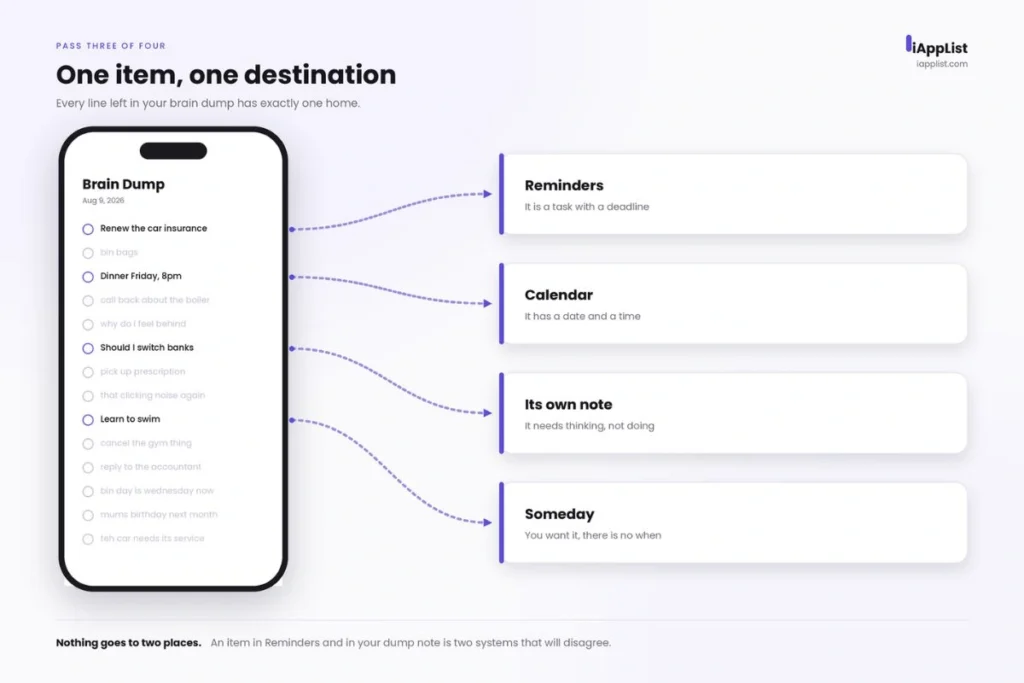
4.4 Pass three: destination (Four minutes)
Everything still unticked has exactly one home, and one home only:
- Reminders, if it is a task with a when
- Calendar, if it is a commitment with a time
- Its own note, if it needs thinking rather than doing
- Someday, if you want it but there is no when
For the Reminders ones, do not retype anything. Select the line of text, tap Share, and pick Reminders.
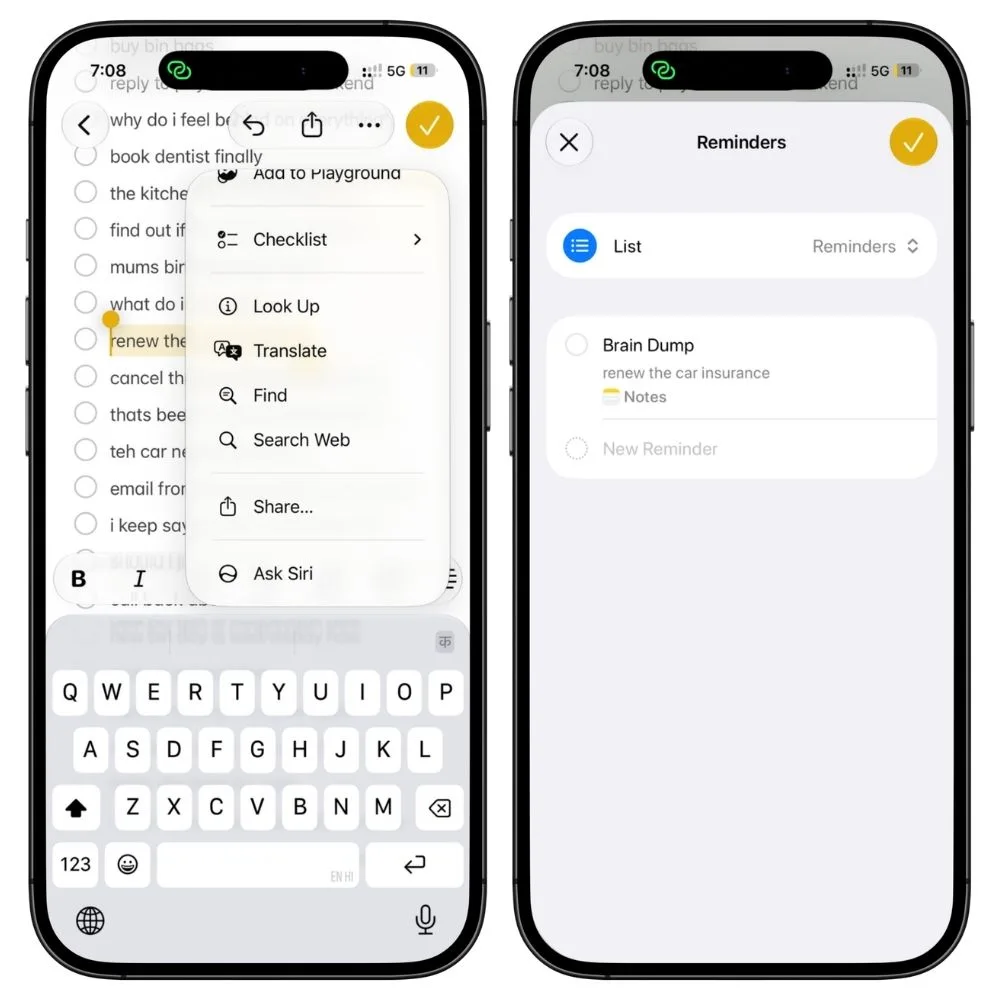
It becomes a reminder with the line as its title, and you are back in the note.
Last week’s leftovers landed like this. “Renew the car insurance” went to Reminders with a date on it. “Sister’s birthday dinner” went to Calendar, because it has a time and other people are involved. “Redesign the site’s homepage” got its own note, because it is a decision and decisions do not belong on a to do list. And “learn basic Swift’ went to Someday, because I want it and there is no honest when attached to it.
Someday is one note, pinned, kept outside your Brain Dump folder. Things go in it, and it is allowed to be long.
One hard rule: one item, one destination. The temptation is to make a reminder, leave it in the note, and mention it in a project note, which is how you end up with three systems that disagree. When an item leaves, it leaves.
4.5 Pass four: carryover (One minute)
This is the step that changes what the system is for.
Every item you sent to Someday, put a dot at the end of the line.
Next week, when the same thing shows up in your dump again, it goes to Someday with a second dot. Third week, third dot, and you stop.
Because an item that comes back three weeks running is not a task you keep failing. It is a task you never defined.
The fix is always the same. Rewrite it as a physical next action, something you could start in the next ten minutes.
“Sort out the insurance” survives forever because there is nothing to start. “Find last year’s policy PDF” dies in four minutes.
The dots are how you find out which of your items are secretly undefined, and you would never notice it from inside a single week’s note.
This is also why weekly notes rather than daily ones.
Last week’s note is still sitting in the folder, one line down from this week’s, so the repeat is visible without you going looking for it.
4.6 When ten minutes is not enough
Some weeks you will open a note with eighty items in it. Ten minutes will not clear that, and pretending otherwise is how people quit.
You do not clear it.
Work top to bottom in the same four passes and get as far as you get.
Whatever is left stays in the note and carries over, dots and all.
The one thing you never skip is finishing: tap New Week, make the next note, and leave the old one in the folder where it is.
Nothing to move, nothing to file. The archive builds itself.
Then close the app. The note being empty is the entire reward, and there is nothing else to maintain.
5. Four mistakes that kill a brain dump habit
5.1 Dumping into whatever app is open
Notes today, Reminders tomorrow, a text to yourself on Thursday.
Split capture across three places and you trust none of them, so your head never lets go of anything.
One destination, or the system does not work.
5.2 Editing while you dump
Rewording a line, moving it up, deciding it is not important enough to write down.
All of that is section 4’s job, and doing it during capture slows you to the point where you stop bothering.
There is no thinking in Phase 2.
5.3 Calling it processing when you are just moving text
Copying items out of the dump note and into a nicer, tidier note is a second dump.
It feels productive, and nothing has changed.
Items leave for Reminders, Calendar, their own note, or Someday. They do not leave for a better-looking note.
Try it for one week
Set it up today. That is the five minutes. Then capture for seven days and process nothing, which is the easy part and the part you already know how to do.
Next Sunday, sit down for ten minutes and run the four passes.
Judge the whole thing on one question: is the note empty when you stand up?
Not organized. Empty.
If it is, you have found the piece that was missing from every previous attempt.
If it is not, the pass just told you which of your items are undefined, and that was worth ten minutes on its own.
MY VERDICT: Apple Notes is not the best tool for brain dump on paper, and I would not argue that it is. Plenty of apps handle capture and processing more elegantly. It is the one already on your Lock Screen at 11 pm on a Wednesday, and for a system that only works if you keep doing it, showing up beats capability every time.
FAQs
What do you write in a brain dump?
Whatever surfaces, in whatever order. Tasks, worries, half ideas, the thing you keep meaning to google. If you stall, ask what you are forgetting and what you are avoiding. Do not filter for importance. That comes later.
How often should you brain dump?
Capture whenever a thought lands, process once a week. There is no dumping session to schedule. The only appointment is the ten-minute pass. If your note regularly hits a hundred items, run the pass twice a week rather than making it longer.
Does brain dumping help with anxiety?
It helps with one narrow part of it. Holding unfinished things in your head takes effort, and writing them somewhere you trust lets you put them down. That relief is real. It is not treatment, though, and if your head stays loud after the note is empty, that is worth talking to someone about.
Can Apple Intelligence organize my brain dump Notes for me?
No. Writing Tools gives you Proofread, Rewrite, and How does this sound. Rewrite rephrases text; it does not group or categorize it. There is no way to hand Notes a messy dump and get sorted categories back.
Is it better to brain dump on paper or on your phone?
Paper wins the dump and loses the week. Nothing beats it for speed, but you cannot send a line of paper to Reminders, and you cannot put last week’s page beside this week’s without going to find it.
Should you delete old brain dump notes?
No. Last week’s note sitting under this week’s is what makes a repeated item visible, and that is the most useful thing this system does. Leave them. A year of text notes is nothing.
What happens if you stop brain dumping for a few weeks?
Nothing breaks. You keep dumping into the same note, it gets longer, and you work through it whenever you come back. There is no streak here, because a system with a streak is a system you can fail at.