
How to Use ChatGPT to Write a Cover Letter (That Actually Gets You Hired)
Here’s what happens when most people use ChatGPT for a cover letter.
They open ChatGPT, type something like “write a cover letter for a marketing manager job at Google,” and hit enter.
ChatGPT gives them 400 words of perfectly structured, completely generic text that starts with “I am writing to express my enthusiastic interest in the Marketing Manager position at Google” and ends with “I would welcome the opportunity to discuss how my skills and experience align with your team’s goals.”
It sounds fine. It reads fine. And it gets ignored — because 50 other applicants sent the exact same letter with different names on it.
That is not ChatGPT’s fault. That is a prompting problem.
When you give ChatGPT vague input, you get vague output. But when you feed it the right information in the right sequence — your actual achievements with real numbers, the specific requirements from the job posting, a clear tone direction, and hard constraints on what not to do — the output is dramatically different.
It stops sounding like a template and starts sounding like something a real person wrote about a real job they actually want.
I tested this myself. I took one job posting and ran it through five different prompting approaches — from the basic one-liner to a full multi-step system with context-setting, drafting, and refinement phases.
The difference between the worst and best output was not subtle.
The basic prompt produced a letter that could apply to literally any company. The system-produced letter referenced specific company initiatives, mapped my experience to exact job requirements, and read like I’d spent an hour writing it by hand. It took 12 minutes.
That is what this guide teaches you. Not a list of 30 prompts to copy-paste. A complete system — a step-by-step workflow that turns ChatGPT from a generic letter generator into a genuine cover letter co-writer.
And if you are wondering whether cover letters even matter anymore: they do. Jobscan’s State of the Job Search report found that applicants who included a cover letter were 3.4 times more likely to land an interview.
Here’s what we are covering:
- Why most ChatGPT cover letters get rejected and what hiring managers actually look for
- The 4-phase system I use to produce tailored cover letters with ChatGPT (with real outputs shown at every step)
- A complete prompt library organized by scenario — entry-level, career changers, internal transfers, senior roles
- How to “de-AI” your letter so it passes both human judgment and detection tools
- The batch workflow for applying to 20+ jobs without starting from scratch each time
Table of Contents
- Why Most ChatGPT Cover Letters Get Rejected (And What Actually Works)
- What You Need Before You Open ChatGPT (The Input Checklist)
- The 4-Phase ChatGPT Cover Letter System
- The Complete Prompt Library (Copy-Paste Ready)
- The Batch Workflow: How to Apply to 20+ Jobs Without Starting From Scratch Each Time
- What ChatGPT Gets Wrong Every Time (And How to Fix It)
- Real Example: Full Walkthrough From Job Posting to Final Letter
- Should You Tell Employers You Used ChatGPT?
- ChatGPT vs. Other AI Cover Letter Tools: Which Should You Use?
- Wrapping Up
- FAQs
Why Most ChatGPT Cover Letters Get Rejected (And What Actually Works)
Before we get into the system, you need to understand why the default approach fails. Because if you skip this part and jump straight to prompts, you will make the same mistakes everyone else makes.
I ran a simple test. I opened ChatGPT and typed: “Write a cover letter for a product marketing manager position at HubSpot.” No resume. No achievements. No context about why I want the job. Just that one sentence.
Here is what ChatGPT gave me (abbreviated):
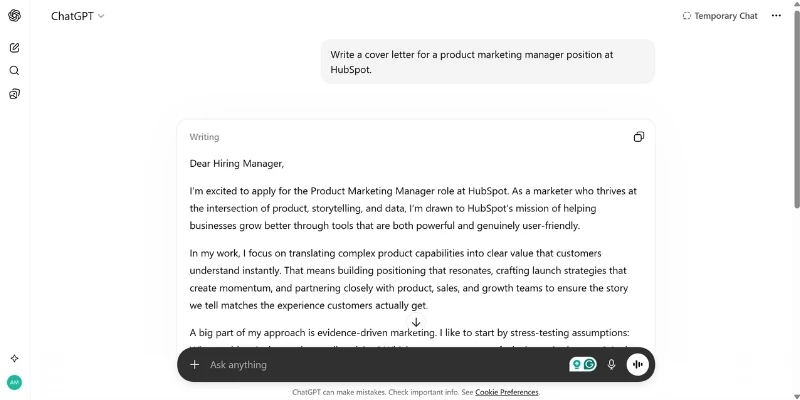
Read that again. There is not a single specific detail in it. No real achievement. No actual number. No mention of anything HubSpot specifically does or cares about. You could swap “HubSpot” for any company name and the letter would read exactly the same.
That is what hiring managers see hundreds of times a week right now. And they are tired of it.
The pattern they recognize instantly
You do not need an AI detection tool to spot a ChatGPT cover letter. Recruiters who review applications daily have identified the tells through sheer repetition:
- The default opener. Some version of “I am writing to express my interest” or “I am excited to apply.” ChatGPT defaults to this roughly 8 out of 10 times when you do not give it specific instructions.
- Vague credibility language. Phrases like “proven track record,” “I bring a unique blend of,” “cross-functional collaboration,” and “data-driven approach” show up constantly. They sound professional in isolation but say absolutely nothing about the actual person writing the letter.
- Uniformly polished tone. Every sentence is grammatically perfect, mid-length, and written in the same cadence. Real human writing has rhythm variation — short punchy sentences mixed with longer ones, an occasional fragment, a word choice that feels personal. ChatGPT’s default output is smooth in a way that actual humans rarely are.
- The predictable closing. “I would welcome the opportunity to discuss how my skills align with your team’s goals.” Nearly word for word, every time.
The numbers behind the rejection
A 2025 TopResume survey of 600 U.S. hiring managers found that roughly 1 in 5 would reject an application outright if they believed it was fully AI-generated. Over a third said they could identify an AI-written resume or cover letter in under 20 seconds.
But here is the thing: the bigger risk is not getting “caught” using AI. The bigger risk is submitting a letter that says nothing specific about you. A hiring manager does not need to prove you used ChatGPT. They just need to feel like your letter could have been written by anyone, and move on to the next candidate.
A head of talent at a European SaaS company put it bluntly in a 2025 interview: after reading an AI-polished letter, they still had no idea who the person was or what they had actually done. That is the real failure mode.
Some companies are going further. Anthropic, the company behind Claude, initially asked all candidates to write application materials without AI assistance so they could assess unassisted communication skills. They later updated this policy to allow AI for refining (but not writing) first drafts. Even in the updated version, the message is clear: employers want to see your thinking first, with AI as a polish layer, not a replacement.
The mindset shift that fixes everything
The problem is not that people use ChatGPT. The problem is how they use it.
When you type “write me a cover letter” with no context, you are asking ChatGPT to guess everything about you — your experience, your achievements, your voice, your reason for wanting this specific job. It has no choice but to produce generic output because you gave it nothing specific to work with.
The fix is not to avoid AI. The fix is to treat ChatGPT as a co-writer instead of an autopilot. You bring the raw material — your real achievements, your actual numbers, your genuine interest in the company. ChatGPT brings speed, structure, and language polish. Together, you produce something neither of you could do as well alone.
That is the difference between a letter that gets ignored and a letter that gets you an interview. And the system for doing this consistently starts with what you prepare before you ever open ChatGPT.
Also Read: How to Use ChatGPT for Interview Prep (The Complete System)
What You Need Before You Open ChatGPT (The Input Checklist)
This is the step most people skip.
They open ChatGPT, start typing a prompt, and wonder why the output sounds like it was written by a stranger. The reason is simple: ChatGPT knows nothing about you until you tell it. And if you tell it very little, it fills the gaps with generic filler.
Before you write a single prompt, spend 10 minutes gathering these four things. This upfront work is what separates a cover letter that sounds like it came off an assembly line from one that sounds like a real person wrote it for a real job.
1. The full job description
Copy the entire job posting — responsibilities, qualifications, preferred skills, company description, all of it. Do not summarize it. Do not pick out the parts you think matter. Paste the whole thing.
ChatGPT is better at identifying what matters in a job posting than most people are, but it can only work with what you give it. When you leave out sections, you lose keywords that might be critical for ATS screening, and you miss context clues about what the employer actually prioritizes.
If the posting is on LinkedIn, click “See more” to expand the full description before copying. If it is on a company careers page, grab everything between the job title and the “Apply” button.
2. Your resume or LinkedIn profile
Paste your full resume as plain text or upload the PDF directly into ChatGPT. If your resume is outdated, your LinkedIn profile works as a substitute — copy your headline, summary, and experience sections.
The key here is completeness.
ChatGPT needs your actual job titles, the companies you worked at, and the specific things you did. If you give it a three-line summary instead of your full experience, it will invent details to fill the gaps. That is how you end up with a cover letter claiming you “spearheaded digital transformation initiatives” when you actually managed a team’s social media calendar. Hallucinated achievements can cost you the job if they come up in an interview.
3. Your evidence bank
This is the piece that changes everything.
Your evidence bank is a short list of your strongest, most specific professional achievements. Each one should include a real number or a concrete outcome.
Here is the difference between weak and strong evidence:
- Weak: “Improved team performance”
- Strong: “Reduced customer response time from 24 hours to 6 hours across a 15-person support team”
- Weak: “Drove revenue growth”
- Strong: “Generated $340K in new pipeline through a cold outreach campaign I built from scratch”
Aim for 5 to 8 bullet points like the strong examples above. These become your reusable ammunition across every cover letter you write.
Beyond the numbers, include one story that only you can tell. A specific challenge you faced, what you did about it, and what happened as a result. This is your anti-generic weapon. ChatGPT cannot invent this. It can only use what you provide.
And when you feed it a real story with real details, the output immediately stops sounding like a template.
Finally, write down — even just in rough notes — why you actually want this specific job at this specific company. Not “I am passionate about your mission.” Something real. Maybe you have used their product for years. Maybe their recent expansion into a market you know well caught your attention. Maybe someone you respect works there.
Whatever it is, write it down so ChatGPT can weave it in naturally instead of defaulting to generic enthusiasm.
4. Company research notes
You do not need to spend an hour on this. Five minutes is enough. Look up three things:
- What the company does — products, customers, market position
- Something recent — a product launch, funding round, new initiative, or expansion
- Culture signals — check the tone of their careers page and job posting. Is it formal and corporate, or casual and startup-y?
If you want ChatGPT to help with this step, here is a quick prompt you can use before starting the cover letter itself:
“I am applying for [Job Title] at [Company Name]. Based on what you know about this company, summarize their core products, target customers, recent news or initiatives, and the general tone of their brand. Keep it brief — bullet points are fine.”
For well-known companies, ChatGPT will give you a useful summary. For smaller or newer companies, you might need to paste in their About page or a recent press release and ask ChatGPT to pull out the key points.
Once you have all four pieces ready — the full job description, your complete resume, your evidence bank, and basic company research — you are set to start the actual system. This is where ChatGPT goes from a generic letter machine to something genuinely useful.
The 4-Phase ChatGPT Cover Letter System
Most people treat cover letter writing with ChatGPT as a single step: paste a prompt, get a letter, send it. That approach produces generic results every time.
The system below breaks the process into four distinct phases, each with its own purpose. You are not asking ChatGPT to do everything at once. You are guiding it through a sequence where each step builds on the last. The whole thing takes 12 to 15 minutes once you have your inputs ready.
Here are the four phases at a glance:
- Phase 1: Decode the job posting (understand what the employer actually wants)
- Phase 2: Generate a targeted first draft (using a system prompt, not a basic one-liner)
- Phase 3: Refine and de-AI the draft (tighten, personalize, remove robotic language)
- Phase 4: ATS check and final polish (keyword alignment, proofreading, human review)
Let’s walk through each one.
Phase 1: Decode the Job Posting with ChatGPT
Before writing a single word of the cover letter, use ChatGPT to understand what the employer actually wants. Job postings are written in HR language that often buries the real priorities. This phase pulls those priorities to the surface so your letter can hit them directly.
Prompt 1: Keyword extraction
Paste the full job description into ChatGPT and use this prompt:
“Here is a job description for [Job Title] at [Company Name]. Extract the top 10 to 15 skills, qualifications, and responsibilities mentioned. Group them into two categories: must-haves (explicitly required) and nice-to-haves (preferred or bonus). List them as bullet points.”
This gives you a clear picture of what the employer considers non-negotiable versus what would be a bonus. You will use this list in Phase 2 to make sure your cover letter addresses the most important requirements first.
Prompt 2: Plain-English translation
“Based on this job description, summarize what this role actually involves on a day-to-day basis. Write it in plain, simple language as if you were explaining it to a friend. Keep it to 4 to 5 sentences.”
This is more useful than it sounds. Job postings are full of jargon like “drive cross-functional alignment” and “own the end-to-end strategy.” The plain-English version helps you understand what the person in this role actually does every day, which makes your cover letter sound like you genuinely understand the job rather than just parroting back their language.
Prompt 3: Requirement-to-proof mapping
This is where your evidence bank comes in. Paste your evidence bank bullet points alongside the extracted requirements and use this prompt:
“Here are the key requirements for this role and my professional achievements. Create a two-column table. Left column: the top 6 requirements from the job description. Right column: the strongest matching achievement or experience from my background. If there is no strong match for a requirement, write ‘Gap’ in the right column.”
This table becomes your cover letter blueprint. You now know exactly which of your achievements to highlight and where you have gaps to address (or skip). The “Gap” column is especially valuable because it tells you what not to force. Trying to cover a gap with vague language is worse than leaving it out and focusing on your strengths.
Phase 2: Generate the First Draft
Now you have context. You know what the employer wants, you know which of your achievements map to those needs, and you have a clear picture of the role. Time to draft.
The system prompt (this is the most important prompt in the entire guide)
The difference between a generic ChatGPT cover letter and a genuinely good one comes down to how you frame the request. Instead of a simple “write me a cover letter,” you give ChatGPT a role, constraints, and specific instructions. Here is the full template:
“You are a career strategist who writes concise, specific cover letters. Write a cover letter for [Job Title] at [Company Name] using the information below.
My background: [Paste your resume or key experience]
My top achievements relevant to this role: – [Achievement 1 from your evidence bank] – [Achievement 2] – [Achievement 3]
Key requirements from the job description: [Paste the must-haves from Phase 1]
Company context: [Paste your research notes or a one-line reference to something specific about the company]
Why I want this role: [Your genuine reason]
Rules: – Keep it under 300 words – Do not start with ‘I am writing to express my interest’ or any variation of that opener – Do not use phrases like ‘proven track record,’ ‘unique blend,’ ‘I am confident that,’ or ‘leverage my skills’ – Lead with my strongest relevant achievement, not a generic introduction – Reference the company specifically at least once (not just the company name, but something about what they do or have done recently) – End with a clear, confident closing that suggests a next step, not a passive ‘I hope to hear from you’ – Tone: professional but conversational, like a smart colleague writing an email, not a formal letter from 2005″
This prompt is long. That is the point. Every constraint you add removes a layer of generic output. The “do not” rules alone eliminate the most common ChatGPT tells. The tone instruction prevents the stiff, over-formal default. The word count cap forces concision instead of letting ChatGPT ramble to 600 words.
Why this works: ChatGPT performs dramatically better when given a specific role (“career strategist”), clear boundaries (what to avoid), and concrete material to work with (your actual achievements). Without these constraints, it defaults to the safest, most generic version of everything. With them, it produces something targeted and specific.
Generate 2 to 3 variations
After your first draft, ask ChatGPT for alternative approaches using the same information:
- “Rewrite this cover letter but lead with a brief story about [specific challenge you overcame] instead of a skills-focused opening.”
- “Rewrite this cover letter with the opening focused on why I am specifically interested in [Company Name] and what they are doing in [specific area].”
You are not looking for a perfect draft from any single version. You are looking for the strongest opening, the best achievement framing, and the most natural closing across all versions. Cherry-pick the best elements and combine them. This takes two minutes and consistently produces a better result than trying to get everything right in one shot.
Phase 3: Refine and De-AI the Draft
You now have a solid first draft. It is better than what 90% of people produce because it is built on real context instead of guesswork. But it still needs work. This phase is about tightening the language, removing any remaining AI-sounding patterns, and making the letter genuinely yours.
Refinement prompts
Run these one at a time. Each one targets a specific problem:
- “Shorten this cover letter to under 300 words while keeping all quantified achievements and the company-specific reference intact.”
- “Replace any generic or vague phrases in this cover letter with specific details from my experience. If a sentence could apply to any candidate, rewrite it so it only applies to me.”
- “Make the opening sentence more direct and attention-grabbing. Do not use any form of ‘I am writing to’ or ‘I am excited to apply.'”
- “Compare this cover letter against the following job description and flag any key requirements I have not addressed: [paste job description]”
You do not need to use all of these every time. Pick the ones that address the weakest parts of your draft. If the opening is already strong but the letter is too long, skip the opening prompt and go straight to the shortening one.
The AI-to-Human editing checklist
This is the step that makes the biggest difference, and it is one you do yourself, not with ChatGPT. After refinement, read through the letter and apply this checklist:
Find and remove these ChatGPT tells:
- “I am excited to…” or “I am thrilled to…”
- “I am confident that…”
- “I would welcome the opportunity…”
- “I bring a unique blend of…”
- “Proven track record”
- “Leverage my skills/experience”
- “Passionate about [company mission]”
- “Dynamic and fast-paced environment”
If any of these appear in your letter, rewrite that sentence from scratch. These phrases are so overused in AI-generated letters that they function as red flags even when a human writes them.
Then check for these:
- The “swap test.” Read every sentence that mentions the company. Could you replace the company name with any other company, and the sentence would still make sense? If yes, that sentence needs to be more specific.
- The “aloud test.” Read the entire letter out loud. Any sentence that feels awkward to say, or that you would never say in a real conversation, needs to be rewritten.
- The “only I could write this” test. Somewhere in the letter, there should be at least one sentence that no other candidate could have written. A specific number, a specific story, a specific reason for wanting this role. If every sentence is generic enough that any qualified person could claim it, add something personal.
- The rhythm check. Look at your sentence lengths. If every sentence is roughly the same length (which is a classic ChatGPT pattern), break up the rhythm. Make some sentences short. Let others run a bit longer with a natural detail added in.
This checklist takes 3 to 5 minutes to apply. It is the difference between a letter that “seems AI” and a letter that reads like a real person wrote it.
Phase 4: ATS Check and Final Polish
Your letter now sounds human, hits the key requirements, and includes specific details about you and the company. The last step is making sure it also passes the automated screening that happens before any human reads it.
What ATS actually does
The vast majority of large companies use Applicant Tracking Systems to filter applications before a recruiter ever sees them. Capterra research found that 75% of recruiters use an ATS in their hiring process, and that number climbs to nearly 99% among Fortune 500 companies.
ChatGPT prompt for ATS alignment
“Compare my cover letter below against this job description. List any important skills, tools, qualifications, or keywords from the job description that are missing from my cover letter. For each missing keyword, suggest where I could naturally incorporate it into an existing sentence without making it sound forced.
Cover letter: [paste your refined draft] Job description: [paste the job description]”
This prompt does two things at once: it identifies gaps and suggests natural placements. The second part is important because keyword stuffing (cramming terms into sentences where they do not fit) is worse than leaving them out. Recruiters and ATS tools both penalize unnatural language.
Final proofread prompt
“Proofread this cover letter for grammar, spelling, and punctuation errors. Also flag any factual claims that seem vague or unverifiable, and any sentences that sound like they could apply to any job at any company.”
This catches small mistakes and also serves as one last generic-language check.
The human final pass
Do not skip this. After all the ChatGPT work, spend two minutes on these checks:
- Accuracy: Is every achievement, metric, and claim in this letter true and something you can back up in an interview?
- Names and details: Is the company name spelled correctly? The job title exact? The hiring manager’s name right (if you are using one)?
- Formatting: Clean paragraphs, professional greeting (“Dear [Name]” or “Dear [Team] Hiring Manager”), proper sign-off. No weird spacing or leftover placeholder text.
- AI detection (optional but smart): Run your final letter through a free AI detection tool like GPTZero or Originality.ai. If it scores high on “likely AI,” go back to the editing checklist and add more personal detail. A well-edited letter that has been through this full system typically scores much lower than a raw ChatGPT output.
That is the complete system. Four phases, roughly 12 to 15 minutes of work, and you have a cover letter that is specific to the job, grounded in your real experience, and edited to sound like you actually wrote it.
The Complete Prompt Library (Copy-Paste Ready)
The 4-phase system above gives you the core workflow. This section is your reference library. Every prompt below is organized by situation so you can find what you need quickly, copy it, and use it.
A quick note before you start: these prompts work best when you have already gathered your inputs (job description, resume, evidence bank) from the checklist earlier. The more context you paste in with the prompt, the better the output.
First-Draft Prompts
The full system prompt (covered in detail in Phase 2 above) is your go-to for any serious application. Use it whenever the job matters to you.
For situations where you need something faster, here are two alternatives:
Quick-draft prompt (5-minute version)
Use this when you are applying to a role that is not your top choice but still worth a solid letter.
“Write a 250-word cover letter for [Job Title] at [Company Name]. Here is the job description: [paste]. Here is my resume: [paste]. Focus on the two strongest matches between my experience and their requirements. Keep the tone professional but natural. Do not use the phrases ‘proven track record,’ ‘I am excited to apply,’ or ‘I would welcome the opportunity.’ End with a confident one-sentence closing.”
Section-by-section prompts
Use these when you want more control over each part of the letter. Write the letter in three separate prompts:
Opening: “Write the opening paragraph of a cover letter for [Job Title] at [Company Name]. Lead with my strongest relevant qualification: [paste specific achievement]. Reference something specific about the company: [paste company detail]. Keep it to 2 to 3 sentences. Do not start with ‘I am writing to’ or ‘Dear Hiring Manager, I am excited to.'”
Body: “Write the body paragraph of a cover letter that maps these three job requirements to my experience. Requirement 1: [paste]. My proof: [paste achievement]. Requirement 2: [paste]. My proof: [paste]. Requirement 3: [paste]. My proof: [paste]. Keep each match to 1 to 2 sentences. Use specific numbers where I have provided them.”
Closing: “Write a closing paragraph for a cover letter applying to [Job Title] at [Company Name]. Restate briefly why I am a strong fit (I [one-line summary of strongest qualification]). End with a clear, confident next step. Do not use ‘I hope to hear from you’ or ‘I would welcome the opportunity.’ Keep it to 2 to 3 sentences.”
Refinement Prompts
Use these after you have a first draft. Pick the ones that address the weakest parts of your letter.
Shorten to word count “Shorten this cover letter to under [X] words. Keep all quantified achievements and the company-specific reference. Cut filler sentences and vague claims first.”
Adjust tone
- More formal: “Rewrite this cover letter in a more formal, corporate tone. Keep the same content and structure but make the language more polished and traditional.”
- More conversational: “Rewrite this cover letter in a more conversational, approachable tone. It should read like a confident email to a hiring manager, not a stiff formal letter.”
- More confident: “Rewrite this cover letter with a stronger, more assertive tone. Replace hedging language (‘I believe,’ ‘I think I could’) with direct statements.”
Remove AI-sounding language “Review this cover letter and identify any phrases that sound generic, templated, or commonly generated by AI. Replace each one with a more specific, natural-sounding alternative. Do not change any factual details or achievements.”
Strengthen the opening “Rewrite only the first sentence of this cover letter. Make it direct, specific, and attention-grabbing. It should immediately communicate my strongest qualification for this role. Do not use any form of ‘I am writing to express’ or ‘I am excited to apply.'”
Scenario-Specific Prompts
These are full-draft prompts tailored for different career situations. Each one includes instructions that address the unique challenge of that scenario.
Entry-level / first job
“Write a 250-word cover letter for [Job Title] at [Company Name]. I am a recent graduate from [University] with a degree in [Field]. I do not have direct professional experience in this role, but here are my relevant experiences: [paste internships, projects, coursework, volunteer work]. Focus on transferable skills and what I accomplished in these experiences rather than job titles. Show enthusiasm for the role without being generic. Keep the tone confident but not overreaching.”
Career changer
“Write a 300-word cover letter for [Job Title] at [Company Name]. I am transitioning from [Current/Previous Industry] to [Target Industry]. Here is my background: [paste resume]. The skills that transfer directly to this new role are: [list 3 to 4 transferable skills with evidence]. Write the letter in a way that frames my different background as an advantage, not a gap. Do not be apologetic about the career change. Focus on what I bring that a traditional candidate might not.”
Internal transfer
“Write a 250-word cover letter for [Job Title] within [Company Name], where I currently work as [Current Role] in [Current Department]. Here are my contributions in my current role: [paste achievements]. My reasons for wanting to move into this new role: [paste]. Write this as someone who already knows and values the company. Reference my internal contributions and how they connect to what this new role needs. Keep it professional but warmer than an external application.”
Return to work after a career gap
“Write a 300-word cover letter for [Job Title] at [Company Name]. I am returning to work after a [duration] break for [brief reason, e.g., caregiving, health, personal development]. Before my break, my relevant experience includes: [paste]. During my time away, I [any relevant activities: freelancing, courses, certifications, volunteering]. Write the letter focusing forward on what I bring to this role, not backward on why I left. Mention the gap briefly and honestly but do not make it the focus of the letter.”
Senior / leadership roles
“Write a 300-word cover letter for [Job Title] at [Company Name]. I am a senior professional with [X years] of experience in [field]. Here are my most significant leadership achievements: [paste 3 to 4 achievements with metrics]. This role interests me because: [paste genuine reason]. Write at a strategic level. Focus on outcomes, team impact, and business results rather than task-level responsibilities. The tone should be confident and peer-level, not deferential.”
Remote-first roles
“Write a 250-word cover letter for [Job Title] at [Company Name], which is a remote or remote-first position. Here is my experience: [paste resume]. I have [X years] of remote work experience. Highlight my ability to work independently, communicate asynchronously, manage my own priorities, and collaborate across time zones. Reference specific examples where I delivered results in a remote or distributed setting.”
Research and Prep Prompts
Use these before you start writing the cover letter to gather context.
Company research summarizer “I am applying for [Job Title] at [Company Name]. Summarize their core products or services, target customers, recent news or company milestones, and the general tone of their brand. Keep it to 5 to 6 bullet points.”
Tone analyzer “Here is the job description for [Job Title] at [Company Name]: [paste]. Based on the language and tone of this posting, would you describe the company culture as formal, conversational, technical, creative, or something else? What tone should my cover letter use to match? Give me a one-sentence tone direction I can use when writing.”
Requirement-to-proof mapper “Here are the key requirements from a job posting and my professional achievements. Create a two-column table. Left column: the top 6 requirements from the job description. Right column: my strongest matching achievement. If there is no strong match, write ‘Gap’ in the right column. Job requirements: [paste]. My achievements: [paste evidence bank].”
Missing keywords finder “Compare this cover letter against the job description below. List any important skills, tools, or qualifications from the job description that are not mentioned in my cover letter. Job description: [paste]. Cover letter: [paste].”
The Batch Workflow: How to Apply to 20+ Jobs Without Starting From Scratch Each Time
Everything above is built for a single application. But most job seekers are not applying to one job. They are applying to 10, 20, sometimes 50.
And the biggest reason people send generic cover letters is not laziness. It is exhaustion. Writing a fully custom letter from scratch for every application is not realistic when you are applying at volume.
This section gives you a system for producing genuinely customized cover letters at speed. The goal: under 5 minutes per letter after the initial setup.
Step 1: Build your master prompt template
Take the full system prompt from Phase 2 and turn it into a reusable template with placeholders. Save it somewhere you can access quickly (a notes app, a Google Doc, a pinned text file).
Here is what the template looks like:
“You are a career strategist who writes concise, specific cover letters. Write a cover letter for [JOB TITLE] at [COMPANY NAME] using the information below.
My background: [PASTE RESUME, keep this the same every time]
My top achievements relevant to this role: – [ACHIEVEMENT 1] – [ACHIEVEMENT 2] – [ACHIEVEMENT 3]
Key requirements from the job description: [PASTE TOP 5 TO 6 REQUIREMENTS]
Company context: [ONE SPECIFIC THING ABOUT THIS COMPANY]
Why I want this role: [ONE GENUINE SENTENCE]
Rules: Keep it under 300 words. Do not start with ‘I am writing to express my interest.’ Do not use ‘proven track record,’ ‘unique blend,’ ‘I am confident that,’ or ‘leverage my skills.’ Lead with my strongest relevant achievement. Reference the company specifically at least once. End with a confident closing. Tone: professional but conversational.”
The parts in brackets are what you swap out for each application. Everything else stays the same.
Step 2: Organize your evidence bank by skill area
You already have your evidence bank from the prep step. Now organize it so you can quickly pick the right achievements for each job. Group them by category:
- Leadership / management: achievements about teams, hiring, mentoring, cross-team projects
- Revenue / growth: numbers around sales, pipeline, conversion, customer acquisition
- Operations / efficiency: process improvements, time saved, cost reductions, automation
- Technical / product: specific tools, systems built, product launches, technical outcomes
- Communication / strategy: campaigns, content, presentations, stakeholder management
You do not need achievements in every category. Most people have 2 to 3 strong categories. That is fine. The point is that when you read a job description, you can quickly identify which category it leans toward and pull the matching achievements.
Step 3: The 5-minute customization workflow
For each new application, follow this sequence:
- Paste the job description into ChatGPT and run the keyword extraction prompt from Phase 1. Takes about 30 seconds.
- Scan the extracted keywords and pick the 2 to 3 achievements from your evidence bank that best match the top requirements.
- Fill in the master prompt template with the job title, company name, selected achievements, one company-specific detail (a quick glance at their homepage or the job posting itself is enough), and your reason for wanting the role.
- Run the prompt. Review the output for 60 seconds. If anything looks off, run one refinement prompt.
- Apply the AI-to-Human checklist. At this point, because the system prompt already has strong constraints built in, this takes 2 to 3 minutes instead of 5. You are mostly checking for the swap test and making sure there is at least one sentence only you could have written.
That is it. Five steps, under five minutes per letter.
Does the quality hold up at speed?
This is the fair question. And the honest answer is: the quality is slightly lower than what you get from the full 4-phase system, but it is significantly higher than what most people submit. You are still producing a letter that references specific job requirements, includes real achievements with numbers, mentions the company by name with a relevant detail, and avoids the most common AI tells.
For your top 3 to 5 dream jobs, use the full 4-phase system and spend 12 to 15 minutes per letter.
For the next 15 to 20 applications where you are a solid fit but it is not your top choice, the batch workflow gets you a strong, customized letter in a fraction of the time.
That split is the most realistic approach for an active job search.
What ChatGPT Gets Wrong Every Time (And How to Fix It)
Even with the system prompt and refinement workflow, ChatGPT has default tendencies that creep in. Knowing what they are makes them easy to spot and fix.
Here are the five most common ones, with the exact language ChatGPT tends to produce and what to replace it with.
1. The “I am writing to express my interest” opener
This is ChatGPT’s favorite opening line. It uses some version of it roughly 8 out of 10 times when you do not specifically tell it not to. Variations include “I am excited to apply for,” “I am thrilled to submit my application for,” and “I am eager to bring my expertise to.”
Why it is bad: The opening sentence is the most valuable real estate in your cover letter. It is the first thing a hiring manager reads, and if it sounds exactly like the last 30 letters they reviewed, their brain switches off. A generic opener signals a generic letter.
The fix: Lead with your strongest relevant qualification or a company-specific hook.
- ChatGPT default: “I am writing to express my enthusiastic interest in the Product Marketing Manager position at HubSpot.”
- Fixed: “I have spent the last four years turning product launches into revenue at B2B SaaS companies, and HubSpot’s recent expansion into AI-powered tools is exactly the kind of challenge I want to work on next.”
The fixed version communicates who you are, what you have done, and why you want this specific job. All in one sentence.
2. The “proven track record” syndrome
ChatGPT loves vague credibility phrases. “Proven track record of success,” “extensive experience in,” “strong background in,” “demonstrated ability to.” These phrases feel professional, but they communicate nothing. They are the verbal equivalent of empty calories.
The fix: Every time you see a vague credibility claim, replace it with a specific number or outcome.
- ChatGPT default: “I have a proven track record of driving growth through data-driven marketing strategies.”
- Fixed: “I grew organic traffic from 12K to 85K monthly visits in 14 months by rebuilding our content strategy around search intent.”
If you cannot replace a vague claim with a specific number, cut the sentence entirely. It is not adding value.
3. The kitchen-sink body paragraph
When you paste your full resume into ChatGPT, it tries to mention everything. You end up with a body paragraph that touches on six different skills, four different roles, and three different industries in 150 words. The result reads like a compressed resume rather than a persuasive argument.
The fix: Constrain ChatGPT to 2 to 3 achievements maximum, and make sure each one maps directly to a top requirement from the job description. Quality beats quantity in a cover letter. A hiring manager who reads about two deeply relevant achievements will be more impressed than one who reads a surface-level tour of your entire career.
If you used the requirement-to-proof mapping table from Phase 1, you already know which achievements to highlight. Stick to those.
4. The sycophantic closing
ChatGPT tends to end cover letters with something like: “I would be thrilled to contribute to your incredible team and would welcome the opportunity to discuss how my skills and experience align with your vision.”
This is filler. It says nothing, and it sounds like flattery. Hiring managers have read this closing hundreds of times.
The fix: End with a confident, specific next step. State what you want to happen and make it easy for the reader to take action.
- ChatGPT default: “I would welcome the opportunity to discuss how my background aligns with your team’s goals. Thank you for your time and consideration.”
- Fixed: “I would love to walk you through how I approached the product launch I mentioned above. I am available for a conversation anytime this week or next.”
Short, direct, and it gives the hiring manager a reason to respond (they are now curious about the product launch details).
5. Hallucinated achievements
This is the most dangerous one.
ChatGPT sometimes invents metrics, exaggerates your experience, or adds achievements you never mentioned. It might turn “managed social media” into “spearheaded a comprehensive digital transformation initiative that resulted in a 200% increase in engagement.” If you never provided that number, ChatGPT made it up.
Why it is dangerous: If you get the interview and someone asks you to elaborate on that 200% engagement increase, you are caught. Even if you do not get asked directly, inconsistencies between your cover letter and your resume raise red flags.
The fix: After every draft, read every single factual claim and ask yourself: did I provide this information, or did ChatGPT generate it? Check every number, every percentage, every outcome statement. If you cannot verify it from your own experience, delete it or replace it with something you know to be true.
This is not optional. It is the single most important quality check in the entire process.
Also Read: How to Use ChatGPT to Write a Resume That Gets Past ATS
Real Example: Full Walkthrough From Job Posting to Final Letter
Everything above is the system. This section shows it in action. We are going to walk through all four phases on a single job application so you can see exactly what happens at each step and what the output actually looks like.
The setup
For this walkthrough, we are using a Product Marketing Manager job posting at a mid-size B2B SaaS company. The posting emphasizes product launches, cross-team collaboration, competitive analysis, and content strategy. It requires 3+ years of experience in product marketing or a related field.
Our fictional candidate has 4 years of marketing experience, mostly in content and product marketing at two SaaS companies. She has specific achievements around product launches, content-led pipeline growth, and sales enablement.
Phase 1 output: Decoding the job posting
We pasted the full job description and ran the keyword extraction prompt. ChatGPT returned:
Must-haves:
- Product launch planning and execution
- Competitive analysis and positioning
- Sales enablement (decks, battle cards, one-pagers)
- Cross-functional collaboration with product and sales teams
- Content strategy tied to product marketing goals
- 3+ years in product marketing or related role
Nice-to-haves:
- Experience with B2B SaaS
- Familiarity with tools like Salesforce, HubSpot, or Marketo
- Data analysis and reporting on campaign performance
Then we ran the requirement-to-proof mapping with the candidate’s evidence bank:
| Requirement | Best matching achievement |
|---|---|
| Product launch execution | Led GTM for 3 product launches in 2024, each hitting 120%+ of first-month adoption targets |
| Competitive analysis | Built a competitive intelligence hub used weekly by 12-person sales team |
| Sales enablement | Created battle cards and one-pagers that sales team credited with shortening deal cycles by ~2 weeks |
| Cross-functional collaboration | Worked directly with product and sales leads on launch sequencing and messaging |
| Content strategy | Grew product blog from 5K to 28K monthly visits through SEO-focused content tied to feature releases |
| B2B SaaS experience | 4 years across two B2B SaaS companies |
No gaps. Strong position. The letter can focus on the top 3 to 4 matches without forcing anything.
Phase 2 output: The first draft
We filled in the system prompt template with the candidate’s evidence bank, the extracted requirements, a company-specific detail (the company recently launched an AI-powered feature), and a genuine reason for interest (“I have been following their product since I was a customer two years ago”).
ChatGPT’s first draft (278 words):
“In the last year alone, I led go-to-market for three product launches at [Current Company], each exceeding first-month adoption targets by over 20%. That kind of launch execution is exactly what [Company Name] needs as you scale your product suite, especially with the recent rollout of [AI Feature].
I have spent four years in B2B SaaS product marketing, and the part I keep coming back to is the intersection of product, sales, and content. At [Current Company], I built a competitive intelligence hub that our 12-person sales team now uses weekly to sharpen their positioning in deals. I also created the battle cards and one-pagers that the team credited with cutting deal cycles by roughly two weeks.
On the content side, I grew our product blog from 5,000 to 28,000 monthly visits by tying every piece to a specific feature release or customer pain point. That content became our second-largest source of qualified pipeline behind paid ads.
I have been a [Company Name] user since 2023, back before [AI Feature] existed. Watching your product evolve from the customer side gives me a perspective I would bring directly into how I position your products and tell your story to the market.
I would love to walk you through how I approached any of the launches or campaigns mentioned above. I am available for a conversation this week or next.”
What worked in this draft: The opening leads with a specific achievement. The company is referenced meaningfully twice (the AI feature and the personal user experience). Every claim includes a number. The closing offers a specific next step.
What needed fixing: The phrase “that kind of launch execution is exactly what [Company Name] needs” is slightly presumptuous. The third paragraph could be tighter. Minor rhythm issues in the second paragraph.
Phase 3: After refinement and the AI-to-Human checklist
We ran the shortening prompt (it was already under 300 words, so minimal changes), then the “replace generic phrases” prompt, then applied the checklist manually.
Changes made:
- Softened the opening from “exactly what [Company Name] needs” to “aligns closely with where [Company Name] is heading”
- Tightened the third paragraph by cutting one sentence
- Broke up two similarly structured sentences in the second paragraph for better rhythm
- Ran the swap test: every company mention is specific. Passes.
- Ran the aloud test: one sentence in the second paragraph felt stiff, so we loosened the phrasing
Phase 4: After ATS check and final polish
We ran the ATS alignment prompt. ChatGPT flagged that the job posting mentioned “data analysis” and “Salesforce” which were not in the letter. We added a brief mention of Salesforce reporting into the sales enablement sentence and decided the data analysis gap was not strong enough to force in.
Final proofread caught one missing comma. Human check confirmed all achievements were accurate and verifiable.
The final letter was 271 words, specific to the company, grounded in real achievements, and read like a confident professional wrote it by hand.
The total time from opening ChatGPT to final letter: 14 minutes. Most of that was in Phases 2 and 3. Phase 1 took about 2 minutes. Phase 4 took about 3.
Should You Tell Employers You Used ChatGPT?
This question comes up constantly, and the answer is more straightforward than most people think.
The current state: Most career experts and job platforms focus on ethical use rather than mandatory disclosure. The consensus is clear on what crosses the line: fabricating achievements, inflating titles, inventing metrics, or copying someone else’s cover letter. Using AI to help articulate your real experience more clearly does not cross that line.
What some employers are doing: A small but growing number of companies explicitly ask candidates to write application materials without AI assistance. Anthropic does this for certain roles. Some legal and consulting firms have started adding similar language. If a job posting or application form says “do not use AI tools,” respect that. It is a clear boundary.
For the vast majority of jobs, there is no such restriction. And most hiring managers understand that candidates use tools to improve their applications, the same way they use spell-check, grammar tools, or feedback from friends and mentors.
The practical reality: If you used ChatGPT to help structure and polish a letter that contains your real experience, your real achievements, and your genuine reasons for wanting the job, you have nothing to hide. That is fundamentally no different from working with a career coach who helps you rewrite your cover letter.
Where it becomes a problem is when the AI did all the thinking for you. If someone asks you about a specific achievement in your cover letter during an interview, and you cannot speak to it in detail because ChatGPT invented it, that is not an AI ethics issue. That is a dishonesty issue.
The best defense against detection is not hiding AI use. It is producing a letter that genuinely reflects your experience, your voice, and your interest in the role. A letter built through the system in this guide, with your real evidence bank and your own edits applied, is yours. The tool you used to draft it does not change that.
ChatGPT vs. Other AI Cover Letter Tools: Which Should You Use?
There are now dozens of AI tools specifically designed for cover letters. Here is an honest breakdown of how they compare to ChatGPT and when each option makes the most sense.
ChatGPT (Free and Plus)
Best for: Full control over voice, tone, and strategy. Candidates who want a genuinely personalized letter and are willing to spend 10 to 15 minutes on the process.
ChatGPT is the most flexible option because you control every aspect of the prompt. You decide what to emphasize, what tone to use, how to structure the letter, and what to avoid. The system in this guide is built around that flexibility. The tradeoff is that ChatGPT requires more effort upfront. It does not analyze job descriptions automatically or score your letter against ATS criteria. You have to guide it.
My recommendation: ChatGPT is the best choice for most people, especially if your cover letter matters for the role. The quality ceiling is higher than any automated tool because you are in the driver’s seat.
Dedicated AI cover letter generators (Teal, Jobscan, ResumeWorded, and similar tools)
Best for: ATS keyword optimization and speed. Candidates who are applying at high volume and want a quick, “good enough” letter with strong keyword coverage.
These tools are built specifically for job applications. You upload your resume and paste a job description, and they generate a cover letter that is optimized for keyword matches. Some of them score your letter against the job posting and highlight gaps.
The advantage is speed and automation. The tradeoff is that the output tends to be more templated and less personal. You have limited control over voice and structure, and the letters often sound similar across different applications.
When to use them: These tools work well as a complement to ChatGPT, not a replacement. You can draft your letter with ChatGPT for better storytelling and voice, then run it through a tool like Jobscan for an ATS keyword check.
The hybrid approach (my recommended workflow for serious job seekers)
For the best results, combine both:
- Draft with ChatGPT using the 4-phase system for voice, personalization, and storytelling
- Run the draft through an ATS tool like Jobscan or Teal to check keyword alignment and catch any gaps
- Final human edit to make sure everything sounds natural and accurate
This gives you the creative flexibility of ChatGPT with the data-driven keyword checks of specialized tools. It adds maybe 3 minutes to the process and gives you confidence that your letter works for both human readers and automated screening.
Quick decision guide
- Applying to your top 5 dream jobs? Use the full ChatGPT 4-phase system. Spend the time. It matters.
- Applying to 20+ jobs where you are a solid fit? Use the batch workflow with ChatGPT, optionally run through an ATS tool.
- Applying to 50+ roles at high speed? A dedicated cover letter generator might save time, but always do a quick human review before sending.
Wrapping Up
Here is the full system in one paragraph: gather your evidence bank with specific, numbered achievements. Decode the job posting with ChatGPT to extract what the employer actually wants. Generate a first draft using a constrained system prompt that forces specificity and blocks generic language. Refine with targeted prompts and apply the AI-to-Human editing checklist. Run an ATS keyword check. Do a final human pass for accuracy and voice.
The whole process takes 12 to 15 minutes for a single application, or under 5 minutes per letter using the batch workflow.
ChatGPT gets you roughly 80% of the way to a strong cover letter. The last 20% is yours: your voice, your real stories, your specific reasons for wanting this particular job at this particular company. That 20% is what gets you the interview.
FAQs
Is it OK to use ChatGPT to write a cover letter?
Yes. Most recruiters view it the same as getting help from a career coach or asking a friend to review your letter. Where it crosses the line is fabricating achievements or submitting unedited AI output without checking it for accuracy. As long as the content reflects your real experience and sounds like you, using ChatGPT is a smart use of a widely available tool.
Can employers tell if I used ChatGPT for my cover letter?
They can often tell if you used it badly. Raw ChatGPT output has recognizable patterns: the “I am writing to express my interest” opener, phrases like “proven track record,” and a uniformly polished tone with no personality. However, a letter built through a structured prompting system and edited with your own voice and real achievements is very difficult to distinguish from a fully human-written letter.
Do cover letters even matter anymore?
Yes. Jobscan’s research found that applicants who included a cover letter were 3.4 times more likely to land an interview. In a landscape where AI-generated applications are flooding inboxes, a well-written, specific cover letter actually stands out more than it did a few years ago because so many applicants are submitting generic ones.
What is the best ChatGPT prompt for a cover letter?
A single one-line prompt will always produce generic output. The most effective approach is a system prompt that includes your resume, 2 to 3 specific achievements, the top job requirements, a company-specific detail, and clear constraints like word count and phrases to avoid. The full system prompt template is in the Phase 2 section of this guide.
How do I make my ChatGPT cover letter not sound like AI?
Remove the phrases hiring managers recognize instantly: “I am excited to apply,” “proven track record,” “I would welcome the opportunity.” Then add at least one sentence only you could have written, something with a specific number or personal detail. Finally, read the letter aloud. If any sentence sounds unnatural, rewrite it. The AI-to-Human Editing Checklist in this guide covers the full process.
Will my cover letter get flagged by AI detection tools?
A raw, unedited ChatGPT output will score high on detection tools like GPTZero. A letter that has been generated through a structured prompt and then manually edited with your own voice will typically score much lower. That said, AI detection tools are not perfectly reliable. Most hiring managers rely on human judgment more than software. The best protection is producing a letter that genuinely sounds like you.
How long should a ChatGPT cover letter be?
Under 300 to 350 words. Most hiring managers spend two minutes or less reading a cover letter, and the majority prefer half a page or shorter. Set the word count constraint to 300 words in your prompt. If ChatGPT produces something longer, use a shortening prompt to trim it while keeping the strongest achievements and company-specific details intact.
Can I use the same ChatGPT cover letter for multiple jobs?
Not the exact same letter. But you do not need to start from scratch each time. The batch workflow in this guide shows how to build a master prompt template with placeholders you customize in about 5 minutes per application. You swap out which achievements you highlight, the company reference, and your reason for wanting the role. Everything else stays the same.
Is using ChatGPT for a cover letter considered cheating?
No. A ResumeBuilder.com survey found that only about 10% of hiring managers strongly considered it cheating. Most are more concerned with the quality and accuracy of your application than how it was produced. The ethical line is clear: do not fabricate achievements, do not inflate your experience, and make sure you can speak to everything in your letter during an interview.
What should I not do when using ChatGPT for a cover letter?
Five mistakes to avoid:
Do not use a vague prompt. Always include your resume, the job description, specific achievements, and tone instructions.
Do not submit the first draft without editing. ChatGPT’s first output is a starting point, not a finished product.
Do not let ChatGPT invent achievements. Fact-check every claim against your actual experience.
Do not ignore the company. Always include at least one specific detail about the company in your letter.
Do not exceed 400 words. Set a word count constraint in your prompt and use a shortening prompt if it runs long.