How Food Scanner Apps Actually Work (Explained Simply)
Food scanner apps look simple on the surface. You open the app, scan a barcode, and instantly see nutrition details, ingredient warnings, or a food quality score.
But what actually happens behind that scan isn’t as straightforward as most people think.
Food scanner apps don’t analyze your food in real time. They don’t “read” ingredients through your camera, and they don’t test what’s inside the package.
Instead, they identify the product, pull existing label data from databases, and interpret that information using their own scoring rules.
That’s why the same product can show different results in different apps — and why some foods don’t scan at all.
In this guide, you’ll learn how food scanner apps actually work, where their data comes from, how barcode scanning really functions, and how nutrition scores are calculated.
We’ll also break down how accurate these apps are, what they’re good at, where they fall short, and how to use them the right way — especially when shopping for packaged foods in U.S. grocery stores.
If you’ve ever wondered whether food scanner apps can really be trusted, or why their results sometimes feel confusing or inconsistent, this guide explains everything in plain English — no hype, no marketing spin.
Table of Contents
- 1. What Food Scanner Apps Actually Do (In Simple Terms)
- 2. Where Food Scanner Apps Get Their Data
- 3. How Barcode Scanning Works Inside Food Scanner Apps
- 4. How Nutrition Information Is Interpreted
- 5. How Food Quality Scores Are Calculated
- 6. Why Different Food Scanner Apps Show Different Results
- 7. Are Food Scanner Apps Actually Accurate?
- 8. Common Myths About Food Scanner Apps
- 9. When Food Scanner Apps Are Useful — and When They Aren’t
- 10. How to Use Food Scanner Apps the Right Way
- 11. Quick Takeaway: What Food Scanner Apps Really Do
- FAQs
1. What Food Scanner Apps Actually Do (In Simple Terms)
When you scan a food product using a food scanner app, the app isn’t analyzing the food itself.
It’s identifying the product and pulling information that already exists about it.
Here’s what actually happens, step by step.
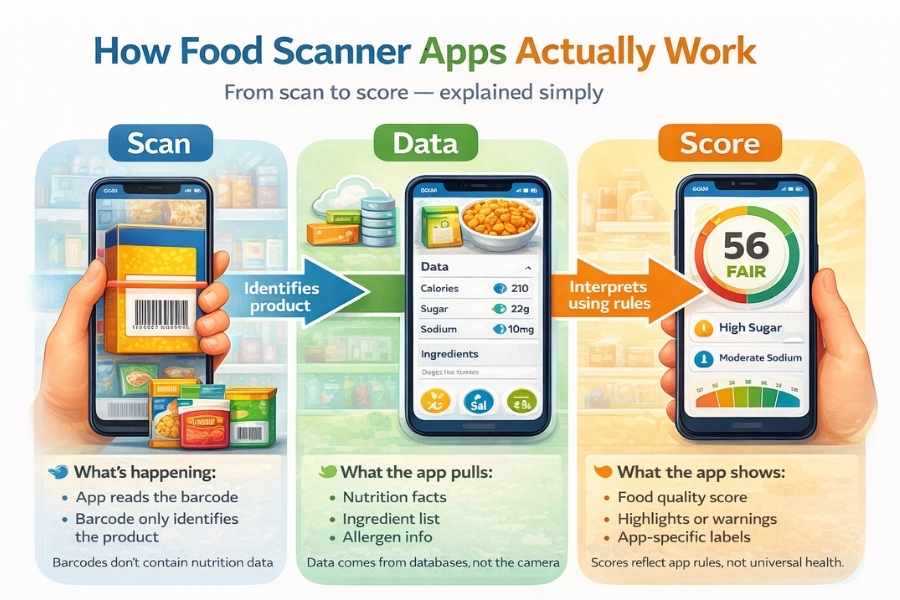
First, the app scans the barcode on the package. That barcode is just an ID. It doesn’t contain nutrition facts, ingredients, or health information. Its only job is to help the app recognize which product you’re scanning.
Once the product is identified, the app looks for a matching entry in its database. This entry usually includes nutrition facts, ingredient lists, allergen information, and sometimes additional data like processing level or additive flags.
After that, the app interprets this information using its own internal rules. This is where things like food quality scores, warnings, or color labels come in. The app isn’t telling you whether the food is “good” or “bad” in an absolute sense — it’s judging the food based on the criteria it was designed to prioritize.
The most important thing to understand is this:
Food scanner apps don’t analyze food in real time. They interpret existing label data.
That distinction explains a lot of common confusion. It’s why scanning the same product in different apps can give different results. It’s also why foods without clear label data, recent packaging updates, or regional variations sometimes fail to scan or show incomplete information.
So when you use a food scanner app, you’re not getting a lab analysis of your food.
You’re getting a structured interpretation of what’s already printed on the label — processed through the app’s own logic.
Once you understand this, everything else about food scanner apps starts to make a lot more sense.
2. Where Food Scanner Apps Get Their Data
Food scanner apps don’t create nutrition data themselves.
Everything they show you comes from data sources that already exist — and this is where accuracy, gaps, and inconsistencies start to show up.
Most food scanner apps rely on a mix of four main data sources.
2.1 Manufacturer-submitted data
A large portion of the information comes directly from food manufacturers. When a company releases a packaged product, it can submit nutrition facts, ingredient lists, and allergen details to databases that food scanner apps pull from.
This data usually matches what you see on the label — but it also means:
- If the manufacturer submits outdated info, the app shows outdated info
- If packaging changes recently, the app may lag behind
Apps don’t always know when a label has been updated.
2.2 Public nutrition databases
Some apps also use public or semi-public nutrition databases that contain standardized food data. These databases help fill gaps, especially for common food categories or older products.
The downside is that these databases aren’t always product-specific.
That’s why some scanned foods show generic nutrition info rather than exact label values.
2.3 User-contributed corrections
Many food scanner apps allow users to:
- Edit incorrect nutrition values
- Upload photos of labels
- Report missing or inaccurate ingredients
This helps improve coverage over time, but it also introduces variation. One user’s correction might be accurate, while another might be incomplete or slightly off.
That’s one reason you might see different data quality depending on how popular or frequently scanned a product is.
2.4 Ingredient list and allergen parsing
Once ingredient text is available, apps analyze it to flag:
- Added sugars
- Artificial sweeteners
- Preservatives
- Common allergens
This analysis is automated. The app isn’t “reading” the ingredient list like a human — it’s matching words and patterns against predefined rules.
So if an ingredient is listed under an unfamiliar name or grouped differently, it may be missed or interpreted differently across apps.
Why some foods don’t scan at all
If a food scanner app can’t find a matching database entry, the scan fails. This commonly happens with:
- New product launches
- Store-brand or regional items
- Imported foods
- Recently rebranded packaging
The app isn’t broken — it just doesn’t have data yet.
Food scanner apps are only as good as the data behind them.
They don’t verify labels, test food, or cross-check ingredients in real time. They simply organize and interpret information that already exists.
Once you understand where the data comes from, it becomes much easier to judge when to trust a scan — and when to double-check the label yourself.
3. How Barcode Scanning Works Inside Food Scanner Apps
A barcode scan feels like the app is “reading” your food.
In reality, the barcode itself contains almost no useful nutrition information.
A standard food barcode — like the UPC codes used on packaged foods in the U.S. — is simply a product identifier. It tells the app which item you’re scanning, not what’s inside it.
Think of the barcode as a name tag, not a nutrition label.
When you scan a barcode, the app converts the black-and-white lines into a numeric code. That number is then used to search the app’s database for a matching product entry. If a match is found, the app pulls whatever data is stored for that product — nutrition facts, ingredients, allergens, and sometimes processing or additive details.
This is an important distinction:
A barcode scan identifies the product, not the food itself.
The barcode doesn’t store calories, sugar content, or ingredient quality. All of that information lives in databases, not in the barcode.
That’s also why:
- Two different apps can show different results for the same barcode
- A barcode scan can succeed in one app but fail in another
- The same product can scan differently after a packaging update
If an app’s database doesn’t have a matching entry for that barcode, the scan fails — even if the food is common or clearly labeled.
This explains a lot of frustration users experience. The camera scan is instant, but everything that matters happens after the scan, when the app tries to match that barcode to reliable data.
Once the product is identified, the next step begins: interpreting the nutrition and ingredient information — and that’s where scoring, warnings, and labels come into play.
Here’s a simple visual that shows what actually happens after you scan a barcode in a food scanner app.
4. How Nutrition Information Is Interpreted
Once a food scanner app identifies a product, it doesn’t just display raw label data and stop there.
It interprets that information before showing it to you — and this interpretation step is where a lot of confusion begins.
Most apps start with the same basics you see on the package:
- Calories
- Macronutrients like fat, carbs, and protein
- Sugar and fiber
- Sodium
- Percent Daily Value (DV)
For U.S. packaged foods, these values are based on FDA nutrition labeling standards. But apps don’t always present them exactly as printed on the label. They reorganize, highlight, or deprioritize certain values depending on what the app is designed to focus on.
Serving size matters more than people realize
Nutrition labels are built around serving sizes, not entire packages. Food scanner apps rely on those serving sizes when interpreting nutrition data.
If a product has a small listed serving size, it can appear “healthier” in the app. If the serving size is larger, the same food can look worse, even though nothing about the food itself changed.
This is why scanning similar products can show big differences that come down to portion assumptions rather than ingredients.
Ingredients vs. nutrition facts
Nutrition facts tell you how much of something is present.
Ingredient lists tell you what is present.
Food scanner apps treat these two sections very differently.
- Nutrition facts are read as numeric data
- Ingredient lists are parsed as text
That means ingredient interpretation depends on word matching. If an ingredient is listed under a less common name or grouped under a broader category, the app may interpret it differently — or not flag it at all.
How Daily Value percentages are used
Many food scanner apps weigh Daily Value percentages heavily, especially for:
- Added sugars
- Sodium
- Saturated fat
But Daily Value is a general guideline, not a personalized recommendation. Apps apply the same thresholds to everyone, regardless of age, activity level, or dietary needs.
So when an app highlights a nutrient as “high” or “low,” it’s doing so based on standardized reference values — not your individual context.
Why interpretation isn’t the same as analysis
This is a subtle but important point.
Food scanner apps don’t analyze how nutrients interact, how often you eat a food, or how it fits into your overall diet. They interpret label data in isolation.
That’s why a single scan can feel overly judgmental or misleading if taken too seriously.
Understanding this interpretation layer helps explain why food scanner apps are useful for awareness — but unreliable for making absolute health decisions.
5. How Food Quality Scores Are Calculated
Food quality scores are the most eye-catching part of food scanner apps — and also the most misunderstood.
When an app shows a score, color grade, or warning label, it’s not measuring how healthy a food actually is.
It’s applying a set of rules created by that app.
There is no universal standard for food quality scoring.
Each food scanner app decides:
- Which nutrients matter most
- Which ingredients should be penalized
- How much weight to give sugar, sodium, fat, or additives
- Where to draw the line between “acceptable” and “unhealthy”
That’s why scores vary so much across apps.
What factors most apps tend to weigh heavily
While scoring systems differ, many apps look closely at:
- Added sugars: Often penalized quickly, even in small amounts.
- Sodium: Especially in packaged and processed foods.
- Saturated fat: Sometimes weighted more than total fat.
- Additives and preservatives: Certain ingredients trigger automatic warnings or score reductions.
- Processing level: Some apps downgrade foods based on how processed they appear, not just nutrition values.
Each of these factors is given a weight, and those weights are subjective.
Why a low score doesn’t always mean “unhealthy”
This is where people get tripped up.
A food can score poorly because:
- It’s high in one nutrient the app dislikes
- It contains an additive the app flags aggressively
- The serving size makes values look worse
None of that means the food is harmful in every context.
A low score simply means the food doesn’t align with that app’s definition of quality.
Why scoring feels inconsistent or harsh
Food quality scores are designed to be simple and fast. That means nuance gets lost.
Apps don’t consider:
- How often you eat the food
- How it fits into your overall diet
- Portion adjustments you personally make
They score one product, in isolation, using fixed rules.
That’s useful for quick comparisons at the store — but risky if taken as a final judgment.
The key thing to remember
Food quality scores are tools, not truths.
They can help you spot patterns, compare similar products, and become more label-aware. But they aren’t health verdicts, and they aren’t meant to replace understanding nutrition labels yourself.
Once you see scores as interpretations rather than facts, food scanner apps become much easier — and healthier — to use.
6. Why Different Food Scanner Apps Show Different Results
If you’ve ever scanned the same product in two different food scanner apps and seen completely different scores, you’re not imagining things. This is one of the most common — and most confusing — experiences users have.
The reason is simple: food scanner apps don’t use the same rules.
Each app builds its own interpretation system on top of the same basic label data. Even when two apps pull identical nutrition facts and ingredient lists, the way they evaluate that information can be very different.
Different priorities, different outcomes
Some apps heavily penalize sugar, even in small amounts. Others focus more on sodium. Some place strong emphasis on additives or processing level, while others care more about calorie density.
So when one app flags a product as “poor” and another rates it as “acceptable,” it’s usually because they’re prioritizing different factors — not because one is wrong.
Different thresholds and cutoffs
Apps also set their own thresholds for what counts as “high” or “low.”
For example:
- One app may flag added sugar above a certain percentage of Daily Value
- Another may allow more flexibility before penalizing the score
These cutoff points are choices, not universal health standards.
Ingredient interpretation varies
Ingredient lists are parsed automatically. That means how ingredients are named, grouped, or ordered can influence how an app reacts.
One app might aggressively flag a preservative, while another treats it as neutral. Some apps lump ingredient groups together; others break them down more granularly.
This is especially noticeable with long ingredient lists or less common additives.
Database differences matter
Not all apps rely on the same databases or update them at the same pace. One app might have newer label data, while another still shows an older version of the same product.
That alone can change scores — even before interpretation begins.
What this means for you
Different results don’t mean food scanner apps are unreliable. They mean the apps are opinionated.
The smartest way to use them is to:
- Compare similar products within the same app
- Focus on patterns, not individual scores
- Avoid treating any single score as a final judgment
Understanding this makes food scanner apps far less frustrating — and far more useful.
What People Think vs. What Actually Happens
| What People Think | What Actually Happens |
|---|---|
| The app scans the food itself | The app scans the barcode, not the food |
| The camera reads ingredients | Ingredients are pulled from databases |
| The app analyzes food quality | The app interprets label data |
| A higher score means healthier | Scores reflect app-specific rules |
| The same food should score the same everywhere | Different apps use different scoring systems |
| One scan tells the full story | Scans show limited, isolated information |
| Food scanner apps replace labels | Apps summarize, labels provide context |
7. Are Food Scanner Apps Actually Accurate?
Food scanner apps are accurate — but only within a very specific scope.
They’re good at showing what’s already on the label.
They’re not designed to tell you how healthy a food is for you.
Once you separate those two ideas, the accuracy question becomes much clearer.
What food scanner apps are accurate about
In most cases, food scanner apps accurately display:
- Nutrition facts as listed on the package
- Ingredient lists provided by manufacturers
- Allergen information when clearly labeled
If the database entry is up to date, what you see in the app usually matches what’s printed on the food label.
Where accuracy starts to break down
Accuracy issues usually come from data gaps, not faulty scanning.
This happens when:
- Label information is outdated
- Products are newly released or recently reformulated
- Store-brand or regional foods aren’t well documented
- User-submitted data hasn’t been reviewed or corrected
In these cases, the app isn’t wrong — it just doesn’t have reliable data to work with.
What food scanner apps can’t measure
This is important to be clear about.
Food scanner apps cannot:
- Verify ingredient quality
- Detect contamination or freshness
- Measure portion size in real life
- Understand your dietary needs or health conditions
They don’t know how often you eat a food, how much you eat, or how it fits into your overall diet.
Why they aren’t medical or health tools
Food scanner apps aren’t regulated as medical devices.
They don’t diagnose, treat, or personalize nutrition advice.
That’s why treating scores or warnings as absolute health judgments can be misleading — especially for people with specific dietary needs or a history of disordered eating.
Food scanner apps are reliable for learning and awareness.
They’re unreliable as decision-makers.
Used correctly, they can help you understand labels faster and compare similar products. Used blindly, they can create confusion or unnecessary stress.
Accuracy isn’t the problem — expectations are.
8. Common Myths About Food Scanner Apps
Food scanner apps are surrounded by a lot of assumptions — mostly because of how simple the scanning experience feels. When something looks instant, it’s easy to assume it’s doing more than it actually is.
Let’s break down the most common myths.
Myth 1: Food scanner apps scan ingredients directly
They don’t.
The camera scan only reads the barcode. The app then pulls ingredient text from its database. It’s not visually analyzing ingredients through your phone camera.
If the ingredient list looks detailed, that’s because it was already stored — not because the app “read” it from the package in real time.
Myth 2: A higher score means the food is healthier for everyone
Food quality scores aren’t personalized.
They’re based on fixed rules applied to standardized nutrition values. What works for one person’s diet may not work for another’s.
A high score doesn’t mean the food is a better choice in every situation — and a low score doesn’t automatically make a food bad.
Myth 3: Food scanner apps replace reading labels
They don’t replace labels. They summarize them.
Apps can highlight patterns and potential red flags, but they remove context. Labels still matter, especially for serving sizes, ingredient order, and allergens.
The app should make labels easier to understand — not make them optional.
Myth 4: All food scanner apps work the same way
They don’t.
Each app has:
- Its own database
- Its own scoring logic
- Its own ingredient priorities
That’s why results vary so much across apps, even when scanning the same product.
Myth 5: If a food doesn’t scan, the app is broken
Usually, it just means the app doesn’t have data yet.
New products, store brands, imported foods, or recently rebranded items often aren’t in databases. A failed scan says more about coverage than quality.
Why clearing these myths matters
Believing these myths leads to frustration and misuse.
Understanding how food scanner apps actually work helps you use them with the right expectations — and get real value from them.
9. When Food Scanner Apps Are Useful — and When They Aren’t
Food scanner apps work best when they’re used for awareness, not control.
They’re tools to help you notice patterns — not tools to make decisions for you.
Knowing when to use them makes a huge difference.
When food scanner apps are genuinely useful
Food scanner apps can be helpful in situations like:
- Comparing similar products at the grocery store – When you’re choosing between two brands of the same item, scanning can quickly highlight differences in sugar, sodium, or ingredients.
- Learning ingredient patterns over time – Repeated scans help you recognize which ingredients show up often in packaged foods and which ones you personally prefer to avoid.
- Spotting additives or allergens – Apps can make it easier to notice preservatives, artificial sweeteners, or allergens — especially when ingredient lists are long or unfamiliar.
- Building label-reading confidence – For people who find nutrition labels overwhelming, food scanner apps can act as a learning aid rather than a shortcut.
When food scanner apps aren’t a good idea
There are situations where food scanner apps can do more harm than good.
They’re not ideal for:
- Medical or therapeutic diets that require professional guidance
- Highly personalized nutrition needs
- People prone to obsessive tracking or food anxiety
Because apps evaluate foods in isolation, they can encourage overly rigid thinking if used without context.
Why intent matters more than the app itself
The same app can be helpful or harmful depending on how it’s used.
If the goal is:
- Awareness → apps help
- Control → apps frustrate
Used thoughtfully, food scanner apps can support better food choices without stress. Used as rulebooks, they often create confusion.
10. How to Use Food Scanner Apps the Right Way
Once you understand how food scanner apps actually work, the goal isn’t to scan more — it’s to scan smarter.
Used the right way, these apps can support better awareness without turning food into a numbers game.
Use them to compare, not judge
Food scanner apps work best when you compare similar products.
For example:
- Two brands of the same snack
- Different versions of the same product (regular vs. low-sugar)
Comparing within the same category keeps the results meaningful. Scanning unrelated foods and comparing scores across categories usually leads to confusion.
Focus on patterns, not individual scans
One scan doesn’t tell you much. Patterns do.
If you notice that certain ingredients or nutrients show up repeatedly across foods you eat often, that’s useful information. Individual low or high scores, on the other hand, don’t deserve much weight on their own.
Always check serving size
Before reacting to a score or warning, look at the serving size the app is using.
A food may appear high in sugar or sodium simply because the serving size is small or unrealistic. Adjusting for how much you actually eat changes the interpretation completely.
Treat scores as signals, not decisions
A food quality score is a signal to look closer — not a final verdict.
If a score surprises you, use it as a prompt to:
- Check the ingredient list
- Look at added sugars or sodium
- Compare alternatives
The score should start a decision, not end it. If you use food scanner apps regularly, pairing them with a non-obsessive approach to calorie tracking can help keep food choices calm and sustainable.
Use apps alongside labels, not instead of them
Food scanner apps are most helpful when paired with label reading.
Apps highlight. Labels explain.
Using both together gives you context, nuance, and control — without relying on an algorithm to decide for you.
The simple rule
If a food scanner app helps you feel more informed, you’re using it correctly.
If it makes you feel anxious, restricted, or confused, it’s time to step back.
The value of these apps isn’t in perfect accuracy — it’s in helping you make calmer, more informed choices.
Scan Smarter: How to Use Food Scanner Apps Without Overthinking
Use this quick checklist every time you scan a food product. It keeps food scanner apps helpful — not stressful.
- Compare similar products only (same category, same type of food)
- Check the serving size before reacting to any score or warning
- Look at the ingredient list, not just the final score
- Treat food quality scores as signals, not decisions
- Scan to notice patterns over time, not to judge single foods
- Double-check the label if a result feels confusing or extreme
- Skip scanning if it starts to feel obsessive or stressful
Simple rule:
If a food scanner app helps you feel more informed, it’s doing its job.
If it makes food feel restrictive or overwhelming, it’s okay to step back.
11. Quick Takeaway: What Food Scanner Apps Really Do
If you remember only one thing from this guide, make it this:
Food scanner apps don’t analyze food — they interpret label data using their own rules.
They’re good at:
- Identifying packaged foods
- Organizing nutrition and ingredient data
- Highlighting patterns like sugar, sodium, or additives
They’re not good at:
- Deciding what’s healthy for you
- Replacing nutrition labels
- Understanding context, portions, or diet balance
Used as awareness tools, food scanner apps can make grocery shopping easier and more informed. Used as decision-makers, they often create confusion or unnecessary stress.
The smartest way to use them is to stay curious, not obedient. Let the scan guide your attention — not your choices.
Food scanner apps evolve, but the scan → data → interpretation process stays the same.
FAQs
How do food scanner apps know what’s in food?
Food scanner apps identify a product using its barcode, then pull nutrition facts and ingredient lists from databases. They don’t analyze the food itself — they rely on existing label data submitted by manufacturers, public sources, or users.
Do food scanner apps actually scan ingredients?
No. The camera scan only reads the barcode. Ingredient information is retrieved from a database and interpreted by the app using predefined rules.
Why does the same food get different scores in different apps?
Each app uses its own scoring system. Even when the nutrition data is the same, apps prioritize different nutrients, additives, or thresholds, which leads to different results.
Are food scanner apps accurate in the U.S.?
They’re generally accurate when label data is up to date and clearly listed. Accuracy issues usually come from outdated databases, new products, or incomplete manufacturer information — not from the scanning process itself.
Can food scanner apps be trusted?
They can be trusted for awareness and comparison, but not as health authorities. They summarize label data; they don’t provide personalized or medical nutrition advice.
Should food scanner apps replace reading nutrition labels?
No. Food scanner apps work best alongside labels. They highlight potential concerns quickly, but labels provide the full context — especially serving size and ingredient order.
Are food scanner apps good for everyday use?
They can be helpful if used occasionally and intentionally. If scanning starts to feel stressful, obsessive, or restrictive, it’s a sign to step back and rely more on labels and general food awareness instead.